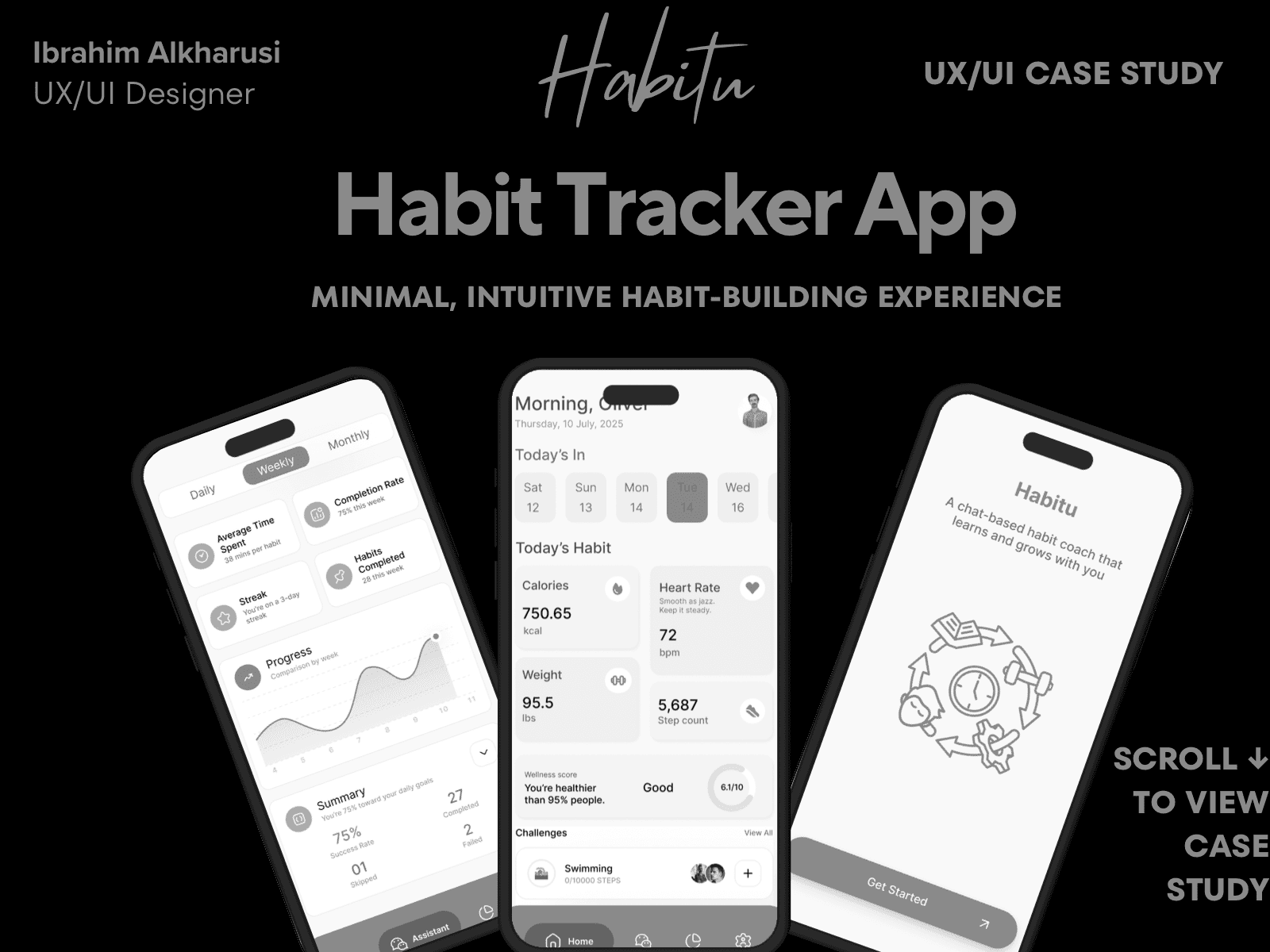
Habitu — Habit Tracker App
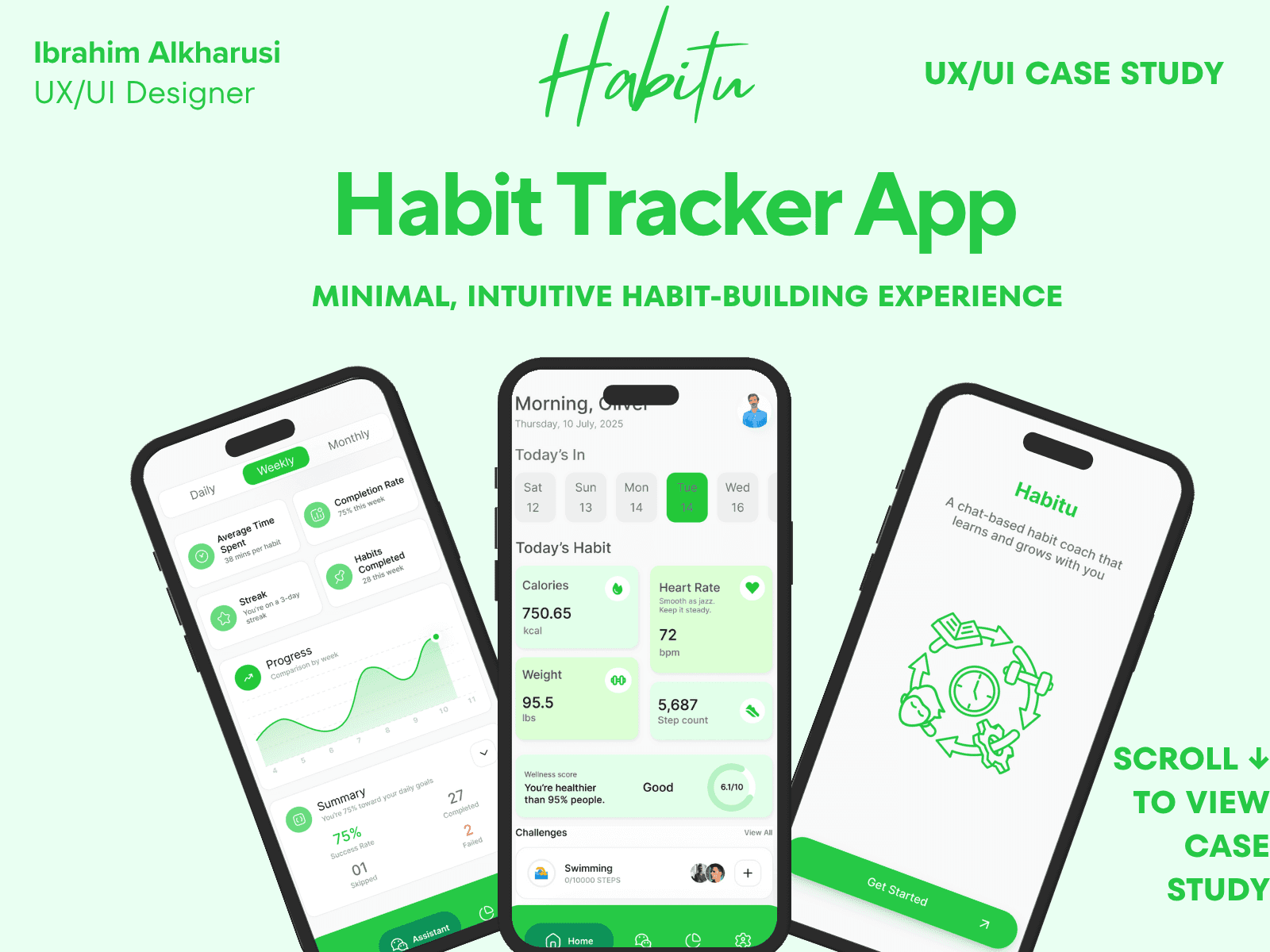
Habitu is a simple habit tracker focused on small wins, daily consistency, and motivating feedback. The project aims to help users build and maintain good habits using behavior loops, streaks, and clean, intuitive interactions.
My Role: Product & UX Designer
Timeline: 5–6 weeks
Responsibilities: User research, user flows, wireframes, UI design, micro-interactions, progress dashboards
Outcome: Delivered a cross-platform (iOS + Android) habit-tracking experience with clear navigation, lightweight visuals, and motivating progress indicators that encourage users to stay consistent.
Case Study Summary
The problem
People struggle to maintain habits because existing habit apps are rigid, noisy with notifications, or fail to adapt to a user’s real-world constraints and energy levels.
The goal
Design a flexible, motivational habit tracker that helps users build routines at their own pace, while reducing pressure and increasing clarity.
What I did
Conducted light research and competitor analysis
Defined core user needs and primary habit-creation journey
Designed task flows and low-fidelity wireframes
Built a clean, modern design system
Designed all UI screens and prototype
Ran usability walkthroughs and refined flows
Key outcomes
Simplified habit creation flow to under 30 seconds
Introduced personalized habit suggestions
Created a progress system that focuses on streak flexibility rather than punishment
Designed a calm, distraction-free interface to improve consistency
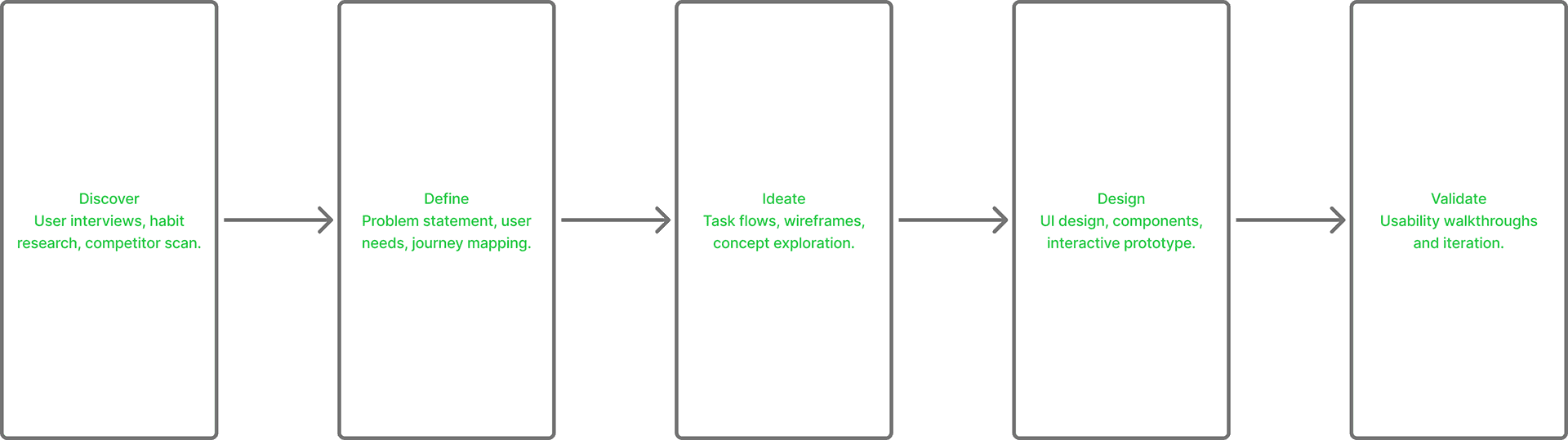
Design Process Overview
01 — Introduction
Habitu started with a simple question:
Why do most habit trackers make people feel guilty instead of motivated?
When I explored existing apps, many of them emphasized streaks, charts, and punishment-heavy feedback. For users who already struggle with consistency, this can feel discouraging. I wanted to create something different — an app that feels supportive, gentle, and achievable.
Habitu is designed to help people form small, meaningful habits through a calm interface, simple daily check-ins, and encouragement-focused micro-interactions. This case study shares how I shaped Habitu from early research and sketches to the final high-fidelity prototype.
02 — The Problem
Through early exploration, I found that people often abandon habit apps because:
Streak systems punish missed days
Interfaces feel too complex or packed with data
Users feel overwhelmed when creating new habits
Tracking becomes a chore after the first week
There’s no emotional support or motivation
Many apps unintentionally create pressure.
The challenge was to design a habit tracker that feels kind, non-judgmental, and built for real life — not perfection.
03 — Research & Insights
To understand user frustrations, I conducted 5 user interviews with people who frequently start but struggle to maintain daily habits. I also analyzed 3 competitor apps to identify usability gaps and motivator breakdowns.
What I heard repeatedly:
“I hate losing streaks… it makes me quit.”
“I want simplicity — not too many steps.”
“Some apps feel like homework.”
“If I don’t see quick wins, I give up.”
Key insights that shaped the design:
Allow flexibility, not punishment
Encourage micro-wins that build confidence
Use soft visuals to reduce pressure
Keep flows short so users stay consistent
Offer a “Today” view with only what matters now
These findings became the foundation of Habitu’s experience.
04 — Defining the Goals
Habitu should:
Encourage consistency without guilt
Simplify the daily check-in process
Help users understand weekly progress at a glance
Feel visually calming and motivational
Support beginners with small, achievable actions
Use microcopy that feels human and uplifting
The overall aim was to remove pressure and highlight progress, no matter how small.
05 — Low-Fidelity Wireframes
I began with quick sketches to define the core structure:
Onboarding
Create-a-habit flow
Daily check-in
Weekly and monthly progress
Today dashboard
Rewards and achievements
These wireframes ensured the app flow remained light, quick, and intuitive. The focus was always:
“What’s the simplest thing a user can do right now?”
06 — Interaction Flow
I mapped out the user journey from the moment they open the app:
Open Habitu
See a clean “Today” screen
Mark one habit completed
Optional: review progress rings
Optional: add or customize habits
Close the app feeling successful
This flow intentionally avoids any overwhelming steps. It supports users whether they check in for 10 seconds or 2 minutes.
The priority was clarity:
no clutter
no guilt messages
no confusing dashboards
Just simple, supportive interactions.
07 — Visual Direction & UI Language
The visual identity for Habitu is built around calmness, motivation, and clarity.
Core visual principles:
Soft gradients and light neutrals
Rounded, friendly card design
Light illustrations and icons
Clear hierarchy with bold “Today” section
Soft greens, warm beiges, and pastel tones
Minimalistic micro-interactions
Gentle animations for progress rings
The UI should feel like a supportive friend — not a strict coach.
08 — High-Fidelity Design
The final UI includes:
A clean “Today” screen showing only active habits
One-tap habit completion
Progress rings for weekly and monthly insights
Motivational microcopy (e.g. “You did great today”)
Personalized habit icons
Streaks that encourage, not punish
Light/dark mode exploration
Simple navigation with tabs: Today, Habits, Profile
The goal was to make every screen feel achievable and uplifting.
09 — Usability Feedback
I shared the prototype with 5 users and gathered honest reactions.
This wasn’t formal lab testing — just practical feedback to improve clarity and emotional tone.
What users loved:
“It feels light and motivating.”
“I like that missing a day doesn’t ruin everything.”
“Very simple — I would actually use this.”
“Love the icons and clean layout.”
Improvements based on feedback:
Strengthened visual contrast for habit icons
Simplified the habit creation flow
Made progress rings easier to understand
Adjusted microcopy to be more positive
Reduced visual noise on the profile page
These small refinements increased ease-of-use and emotional comfort.
10 — Impact & Learnings
Designing Habitu taught me valuable lessons about behavior, motivation, and UX clarity:
Users thrive with simple systems, not strict ones
UI tone deeply affects emotional engagement
Encouragement works better than punishment
Micro-wins keep people coming back
Minimalism reduces cognitive load
Iterative testing always reveals overlooked details
This project strengthened my approach to emotional design, interaction simplicity, and building mobile experiences that feel human and welcoming.
11 — What’s Next for Habitu
Looking ahead, I envision expanding Habitu with:
Smart suggestions based on user behavior
Personalized habit reminders
Quick journaling integrated into daily check-ins
Light community challenges
Mood + habit correlation insights
Achievements based on consistency, not perfection
The long-term vision is to help users build better habits, not through pressure — but through support, clarity, and calm motivation.
Process
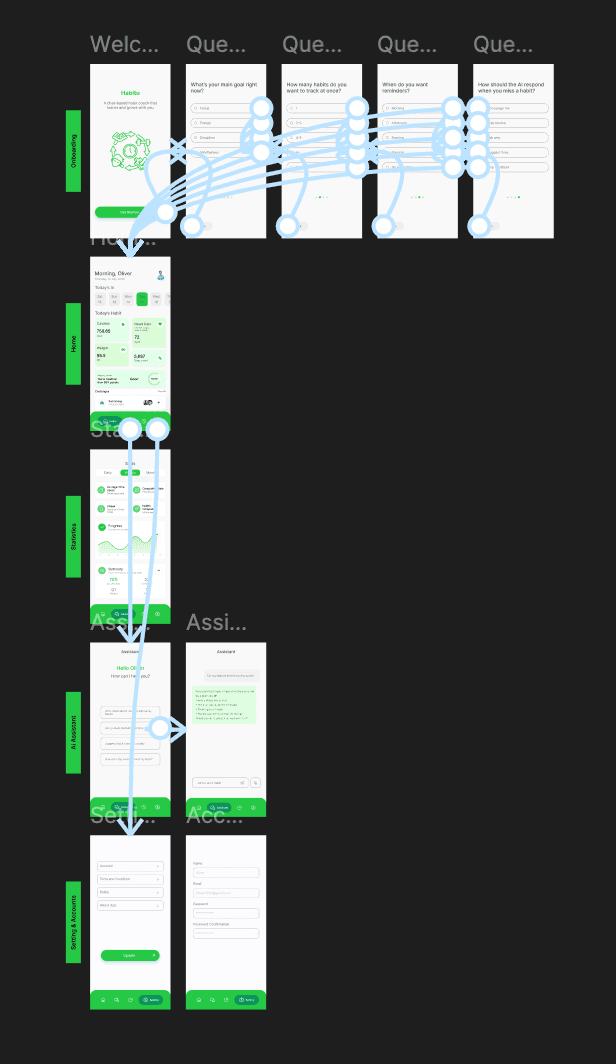
Research → User Flow → Wireframes → High-Fidelity Design → Prototype
Created a simple 3-level time filter (Daily / Weekly / Monthly).
Mapped an “Assistant” tab that provides a chat-based interaction model.
Designed a visual progress graph and completion rate overview.
Used a fresh green palette and generous whitespace for focus.
Built an animated prototype to test with early users.
Key Scenes

Welcome Page
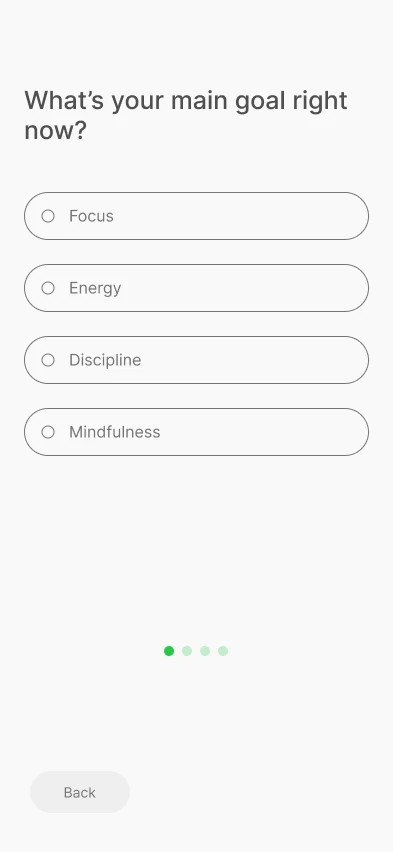
Question 1
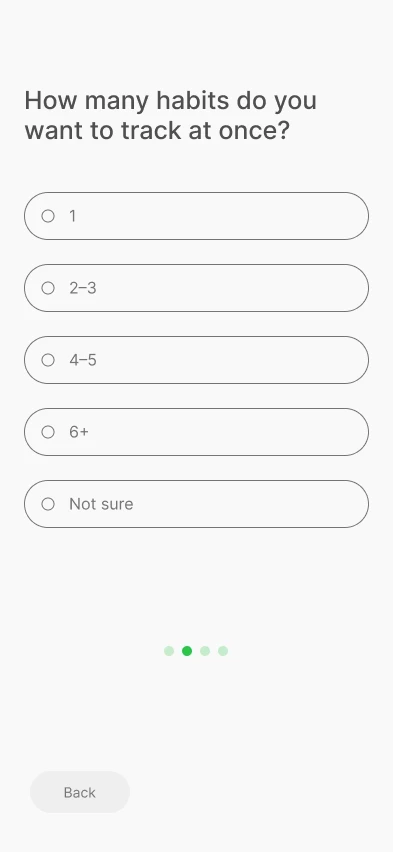
Question 2
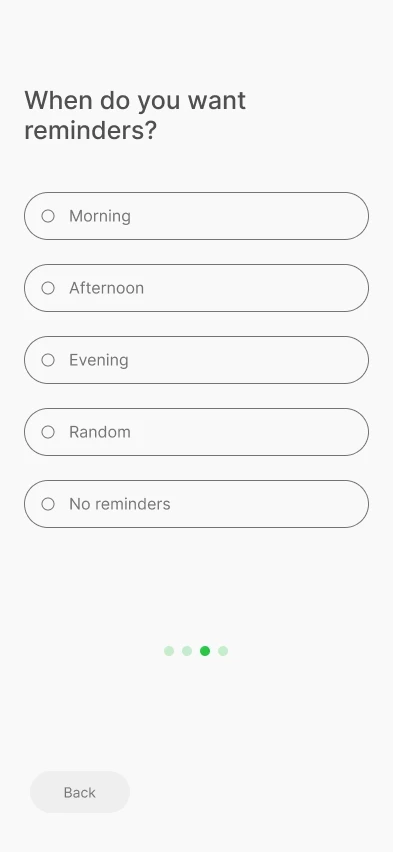
Question 3
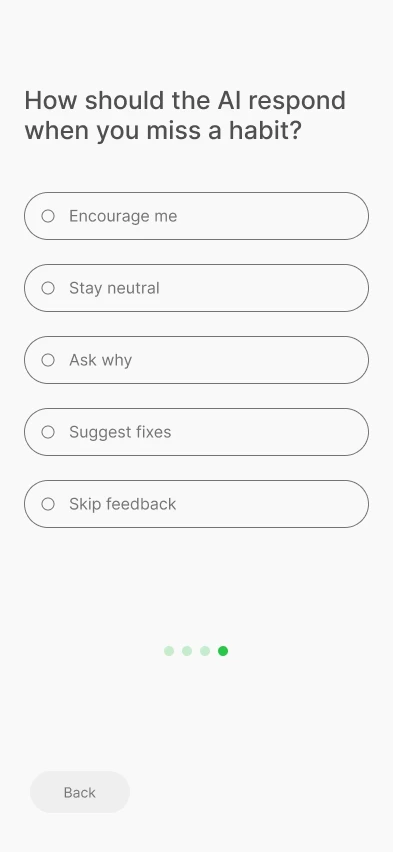
Question 4
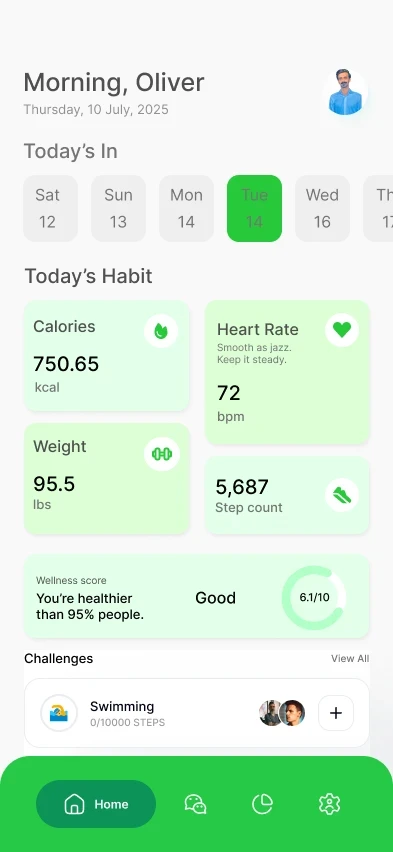
Home Page
Design System
Colors: Vibrant green gradient for motivation and growth.
Typography: Modern sans-serif with a medium weight for clarity.
Components: Cards, habit tiles, and progress rings designed for rapid scanning and positive feedback.
Prototype
👉 View Interactive Figma Prototype
Outcome & Reflection
1/ Created a motivating, minimalist tool that users described as “rewarding to open daily.”
2/ Learned how emotional design principles increase retention in productivity apps.
3/ Future iteration: Introduce social challenges and personalized weekly summaries.